# Alluxio Namespace and Under File System Namespaces
## Introduction
Alluxio enables effective data management across different storage systems. Alluxio provides a unified view of all data sources. Alluxio achieves this by using a mount table to map paths in Alluxio to those storage systems.
We use the term "Under File System (UFS)" for a storage system managed and cached by Alluxio. Alluxio is built on top of the storage layer, providing cache speed-up and various other data management functionalities. Therefore, those storage systems are "under" the Alluxio layer.
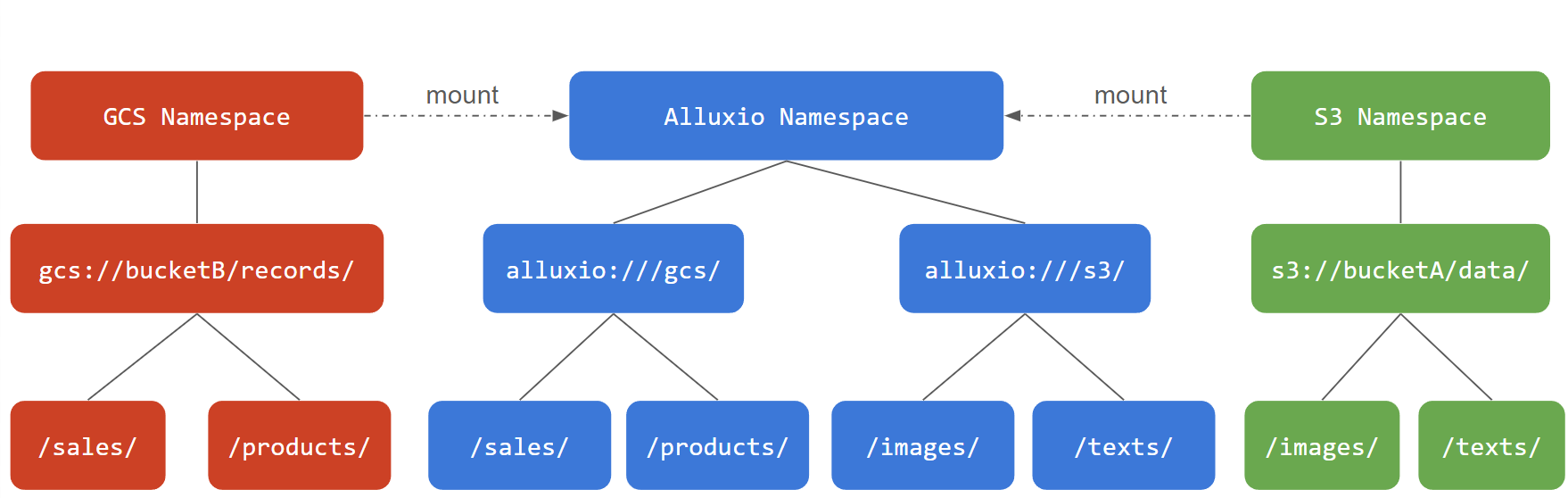
A user "mounts" a UFS to an Alluxio path. The example below illustrates how a user mounts an S3 bucket and a GCS bucket to Alluxio.
The mount table for the example above will look like:
```
Alluxio Paths UFS Paths
=================== =========================
/s3/ s3://bucketA/data/
/hdfs/ hdfs://hdfs-cluster.company.com/records/
```
## Configuring the Mount Table
Alluxio supports using ETCD to store the mount table information. By storing the mount table in ETCD, all Alluxio processes (clients, workers, etc.) will read ETCD for the mount table information.
To use ETCD as the mount table backend, add the following configurations to `alluxio-site.properties`:
```properties
alluxio.mount.table.source=ETCD
alluxio.etcd.endpoints=
```
Set `alluxio.etcd.endpoints` to be the list of instances in the ETCD cluster, e.g.
```properties
# Typically an ETCD cluster has at least 3 nodes, for high availability
alluxio.etcd.endpoints=http://etcd-node0:2379,http://etcd-node1:2379,http://etcd-node2:2379
```
ETCD is required to be running when Alluxio processes start to initialize the mount table. Subsequently they will regularly poll ETCD for updates on the mount table. The poll interval is specified by the configuration below in `alluxio-site.properties`.
```properties
# By default a poll happens every 3s
alluxio.mount.table.etcd.polling.interval.ms=3s
```
In a large cluster with thousands of Alluxio clients and hundreds of Alluxio workers, you may want to use a larger interval to reduce the pressure on ETCD. If your mount table is seldom updated, feel free to use a much larger interval like 30s or more.
## Mount Table Operations
Add or remove mount points using the Alluxio command line:
```console
# Add a new mount point
$ bin/alluxio mount add --path /s3/ --ufs-uri s3://bucketA/data/
Mounted ufsPath=s3://bucketA/data to alluxioPath=/s3 with 0 options
# Remove an existing mount point
$ bin/alluxio mount remove --path /s3/
Unmounted /s3 from Alluxio.
```
List the mount table using the `bin/alluxio mount list` command:
```console
$ bin/alluxio mount list
Listing all mount points
s3a://data/ on /s3/ properties={}
file:///tmp/underFSStorage/ on /local/ properties={}
```
> Note: It takes a little while for all Alluxio components to reload the updated mount table from ETCD. The time depends on `alluxio.mount.table.etcd.polling.interval.ms`.
## Configuring for UFS
Alluxio processes will need configurations specific to the UFS in order to correctly access it, most notably security credentials.
### Use the same configurations for all mount points
You can leave all the UFS configurations in `alluxio-site.properties` and Alluxio will use those configurations for all mount points of that UFS type. For example:
```properties
# Configure the S3 credentials for all mount points
s3.accessKeyId=
s3.secretKey=
alluxio.underfs.s3.region=us-east-1
alluxio.underfs.s3.endpoint=http://s3.amazonaws.com
# Configure the HDFS configurations for all mount points
alluxio.underfs.hdfs.configuration=/path/to/hdfs/conf/core-site.xml:/path/to/hdfs/conf/hdfs-site.xml
```
All mount points will use the same S3 credentials and HDFS configurations. This is the simplest way to configure Alluxio for mount points if all UFS of the corresponding type can use the same configuration. It is the simplest way to manage all configuration properties in one `alluxio-site.properties` file.
## Use different configurations for different mount points
It is common that a user may want to use different configurations for different mount points. For example, if a user has two mount points to S3-flavor paths, one backed by AWS S3 and the other backed by MinIO, they will need to use different credentials and endpoints for each mount point.
```
Alluxio Paths UFS Paths
=================== ===========================
/s3-images s3://bucketA/data/images
/minio-tables s3://bucketB/data/tables
```
You can specify mount options while you add a new mount point.
```console
$ bin/alluxio mount add --path /s3/ --ufs-uri s3:/// \
--option s3.accessKeyId= --option s3.secretKey= \
--option alluxio.underfs.s3.endpoint=http://s3.amazonaws.com \
--option alluxio.underfs.s3.region=us-east-1
```
In this way, you specify configuration properties for this specific mount point.
> Note: If you specify mount options in the command line, please remove those configuration options from the `alluxio-site.properties` file to avoid confusion as the mount options will take precendence.
To update mount options for an existing mount point, it must be first unmounted and then mounted again with the updated options.
```console
$ bin/alluxio mount remove --path /s3/ --ufs-uri s3:///
$ bin/alluxio mount add --path /s3/ --ufs-uri s3:/// \
--option s3.accessKeyId= --option s3.secretKey= \
--option alluxio.underfs.s3.endpoint=http://s3.amazonaws.com \
--option alluxio.underfs.s3.region=us-west-2
```
## Advanced
### Example: Multiple heterogenous mounts
Let's look at a more complicated mount table example.
```
Alluxio Paths UFS Paths
=================== ===========================================
/s3-images s3://my-bucket/data/images
/s3-tables s3://my-bucket/data/tables
/hive-data hdfs://hdfs-cluster.company.com/user/hive
/presto-data hdfs://hdfs-cluster.company.com/user/presto
```
The mount table from the example above consists of 4 entries. The first column is the paths of mount points in Alluxio namespace and the second column lists the corresponding UFS paths that are mounted on Alluxio.
The first mount entry defines a mapping from an S3 path `s3://my-bucket/data/images` to an Alluxio path `/s3-images`. Any objects with the S3 prefix `s3://my-bucket/data/images` will be available under the Alluxio directory `/s3-images`. For example, `s3://my-bucket/data/images/collections/20240101/sample.png` can be found at Alluxio path `/s3-images/collections/20240101/sample.png`.
The second mount entry defines a mapping from an S3 path `s3://my-bucket/data/tables` to an Alluxio path `/s3-tables`. The UFS path is actually from the same bucket as the first mount entry. As this example shows, users may freely choose parts of their UFS namespaces to mount to Alluxio.
The third and fourth entries define mappings between the Alluxio paths `/hive-data` and `/presto-data` to two directories in the same HDFS, `hdfs://hdfs-cluster.company.com/user/hive` and `hdfs://hdfs-cluster.company.com/user/presto` respectively. Similarly, files and directories under the two HDFS directory trees will be available at their corresponding Alluxio paths. For example, `hdfs://hdfs-cluster.company.com/user/hive/schema/table/part1.parquet` becomes `/hive-data/schema/table/part1.parquet` in Alluxio namespace.
### Mount Table Rules
A few rules must be followed when defining mount points in Alluxio.
**Rule 1. Mount directly under root path `/`**
A mount point in Alluxio MUST be a direct child of the root path `/`. For example, `/s3-images`, `/hive-data` and `/presto-data` are valid mount points. The root path `/`, is just a virtual node in Alluxio namespace. It does NOT map to any UFS path.
```
# This is invalid, you cannot mount to the root path directly
/ s3://my-bucket/
# This is invalid, a mount point can only be directly under /
/s3-images/dataset1 s3://my-bucket/data/images/dataset1
# This is valid
/s3-images s3://my-bucket/data/images/dataset1
```
**Rule 2. No nested mount points**
Mount points cannot be nested. The Alluxio path of one mount point cannot be under the Alluxio path of another mount point. Similarly, the UFS path of one mount cannot be under the UFS path of another mount point.
```
# Suppose we have this mount point
/data s3://bucket/data
# This new mount point is invalid -- the Alluxio path is under an existing mount point
/data/hdfs hdfs://host:port/data
# This is also invalid -- the UFS path is under an existing mount point
/images s3://bucket/data/images
```