> For the complete documentation index, see [llms.txt](https://documentation.alluxio.io/ee-da-en/llms.txt). Markdown versions of documentation pages are available by appending `.md` to page URLs; this page is available as [Markdown](https://documentation.alluxio.io/ee-da-en/administration/monitoring-alluxio.md).
# Monitoring Alluxio
Metrics provide invaluable insight into your Alluxio cluster's health and performance. Alluxio exposes metrics in the [Prometheus exposition format](https://prometheus.io/docs/instrumenting/exposition_formats/), allowing for easy integration with modern monitoring stacks.
This guide covers how to monitor your Alluxio cluster, from using the pre-configured dashboards provided by the Alluxio Operator to setting up your own monitoring manually.
## Default Monitoring with the Alluxio Operator
The easiest way to monitor Alluxio on Kubernetes is with the Alluxio Operator. By default, the operator deploys a complete monitoring stack alongside your Alluxio cluster, including [Prometheus](https://prometheus.io/) for metrics collection and [Grafana](https://grafana.com/) for visualization.
### Accessing the Grafana Dashboard
The Grafana dashboard is the primary tool for visualizing your cluster's metrics. You can access it in two ways:
#### 1. Accessing via Port Forwarding (Recommended)
Use `kubectl port-forward` to securely access the Grafana UI from your local machine.
```console
# Find the Grafana pod and forward port 3000
kubectl -n alx-ns port-forward $(kubectl -n alx-ns get pod -l app.kubernetes.io/component=grafana -o jsonpath="{.items[0].metadata.name}") 3000:3000
```
You can then open your browser and navigate to `http://localhost:3000`.
#### 2. Accessing via Node Hostname
If your Kubernetes nodes are directly accessible on your network, you can reach Grafana via its NodePort.
```shell
# Get the hostname of the node where Grafana is running
kubectl -n alx-ns get pod $(kubectl -n alx-ns get pod -l app.kubernetes.io/component=grafana --no-headers -o custom-columns=:metadata.name) -o jsonpath='{.spec.nodeName}'
```
Assuming the hostname is `foo.kubernetes.org`, you can access the Grafana service at `http://foo.kubernetes.org:8080/`.
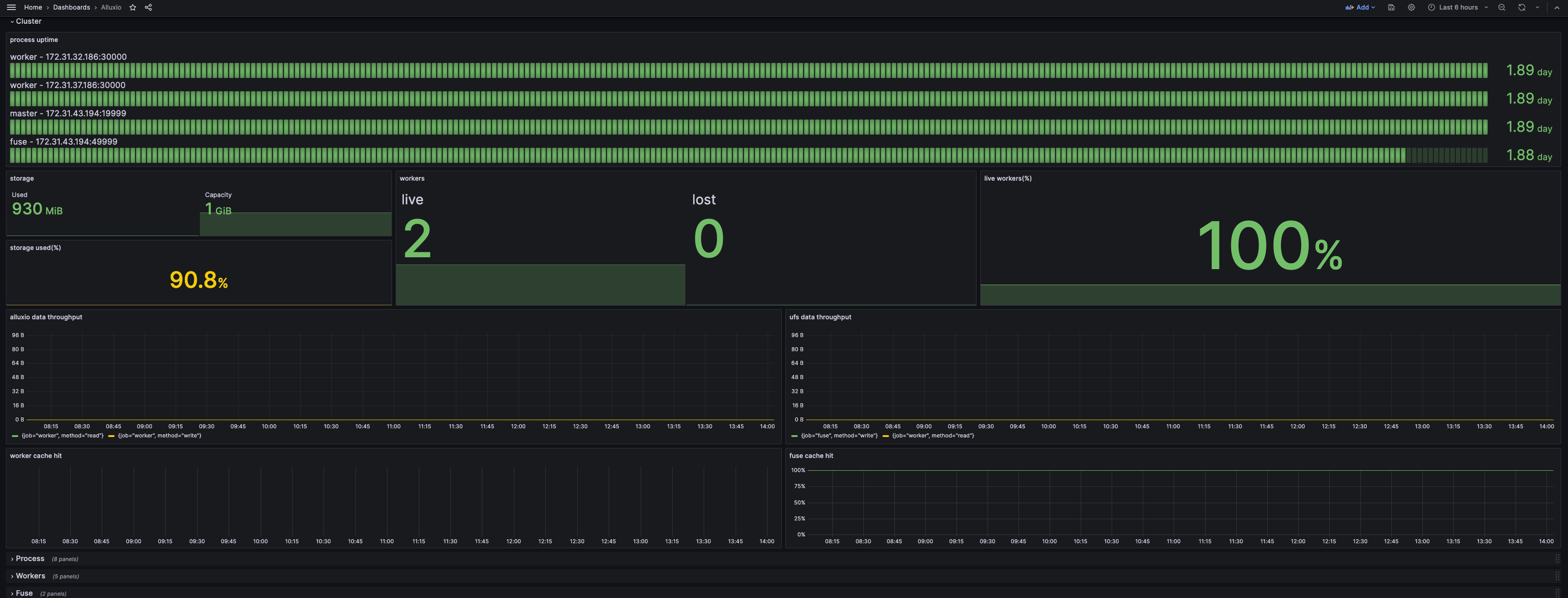
### Understanding the Dashboard
The default dashboard provides a comprehensive overview of your cluster's state.
* The **Cluster** section gives a high-level summary of the cluster status.
* The **Process** section details resource consumption (CPU, memory) and JVM metrics for each Alluxio component.
* Other sections provide detailed metrics for specific components like the coordinator and workers.
### Disabling the Default Grafana
If you wish to use your own Grafana instance, you can disable the default one by setting `spec.grafana.enabled` to `false` in your `AlluxioCluster` definition. Prometheus is a core component and cannot be disabled.
```yaml
apiVersion: k8s-operator.alluxio.com/v1
kind: AlluxioCluster
spec:
grafana:
enabled: false
```
### Advanced: Querying Metrics Directly
For advanced analysis or debugging, you can query the Prometheus and component endpoints directly.
#### Querying with Promtool
You can execute queries directly against the Prometheus server running in your cluster.
```shell
# Open a shell into the Prometheus pod
kubectl -n alx-ns exec -it $(kubectl -n alx-ns get pod -l app.kubernetes.io/component=prometheus --no-headers -o custom-columns=:metadata.name) -- /bin/sh
# Example: List all available Alluxio metrics
promtool query instant http://localhost:9090 'count({__name__=~".+"}) by (__name__)' | grep alluxio_
# Example: Get the total cache capacity
promtool query instant http://localhost:9090 'alluxio_cached_capacity_bytes'
# Example output:
# alluxio_cached_capacity_bytes{instance="worker:30000", job="worker"} => 10737418240 @[1753677978.351]
```
#### Querying Component Endpoints
Alluxio components (coordinator, workers) expose a `/metrics/` endpoint for scraping.
```shell
# Get metrics directly from a component (e.g., local coordinator)
$ curl 127.0.0.1:19999/metrics/
```
Refer to the Metrics Reference for a complete list of available metrics.
## Integrating with an Existing Monitoring System
If you are not using the Alluxio Operator or have an existing monitoring infrastructure, you can integrate Alluxio with it manually.
### Integrating with Prometheus
Add the following scrape jobs to your `prometheus.yml` to collect metrics from Alluxio.
#### Standalone Prometheus
For a standalone Prometheus instance, use `static_configs`:
```yaml
global:
scrape_interval: 60s
scrape_configs:
- job_name: "coordinator"
static_configs:
- targets: [ ':' ]
- job_name: "worker"
static_configs:
- targets: [ ':' ]
```
#### Prometheus in Kubernetes
For Prometheus running in Kubernetes, use `kubernetes_sd_configs` to automatically discover Alluxio pods. Ensure your Alluxio pods have the required labels and annotations.
```yaml
# prometheus.yml snippet for Kubernetes service discovery
scrape_configs:
- job_name: 'alluxio-components'
kubernetes_sd_configs:
- role: pod
relabel_configs:
# Keep only pods with the prometheus.io/scrape=true annotation
- source_labels: [__meta_kubernetes_pod_annotation_prometheus_io_scrape]
action: keep
regex: true
# Scrape only Alluxio components
- source_labels: [__meta_kubernetes_pod_label_app_kubernetes_io_name]
action: keep
regex: alluxio
# Use the annotated path, default to /metrics
- source_labels: [__meta_kubernetes_pod_annotation_prometheus_io_path]
action: replace
target_label: __metrics_path__
regex: (.+)
# Use the annotated port
- source_labels: [__address__, __meta_kubernetes_pod_annotation_prometheus_io_port]
action: replace
regex: ([^:]+)(?::\d+)?;(\d+)
replacement: $1:$2
target_label: __address__
# Create a 'job' label from the component name
- source_labels: [__meta_kubernetes_pod_label_app_kubernetes_io_component]
action: replace
target_label: job
```
Your Alluxio pods must have the following metadata:
```yaml
# Example metadata for an Alluxio worker pod
metadata:
labels:
app.kubernetes.io/name: alluxio
app.kubernetes.io/component: worker # (or coordinator)
annotations:
prometheus.io/scrape: "true"
prometheus.io/port: "30000" # (19999 for coordinator)
prometheus.io/path: "/metrics/"
```
### Integrating with Grafana
1. **Add Prometheus as a Data Source**: In Grafana, add your Prometheus server as a new data source.
2. **Import the Alluxio Dashboard**: Download the official Alluxio dashboard template and import it into Grafana.
* **Template URL**: [alluxio-da-dashboard-template.json](https://alluxio-binaries.s3.amazonaws.com/artifactsBundle/ee/DA-3.5-10.2.0/alluxio-dashboard-template.json)
* Follow the [Grafana import guide](https://grafana.com/docs/grafana/latest/dashboards/export-import/#importing-a-dashboard).
### Integrating with Datadog
Datadog can ingest metrics directly from Alluxio's Prometheus endpoints.
1. Ensure your Datadog agent can reach the Alluxio component's metrics port (`19999` for coordinator, `30000` for workers).
2. In your Datadog configuration, add the Alluxio endpoints to your `prometheus.yml` check configuration.
Example `conf.d/prometheus.d/conf.yaml` snippet:
```yaml
instances:
- prometheus_url: http://:19999/metrics
namespace: alluxio
metrics:
- "*"
- prometheus_url: http://:30000/metrics
namespace: alluxio
metrics:
- "*"
# Add an entry for each worker
```
This configuration allows Datadog to collect, monitor, and alert on your Alluxio cluster's metrics.