> For the complete documentation index, see [llms.txt](https://documentation.alluxio.io/ee-ai-en/llms.txt). Markdown versions of documentation pages are available by appending `.md` to page URLs; this page is available as [Markdown](https://documentation.alluxio.io/ee-ai-en/ai-3.6/data-access/performance/file-writing.md).
# File Writing
{% hint style="warning" %}
This feature is experimental.
{% endhint %}
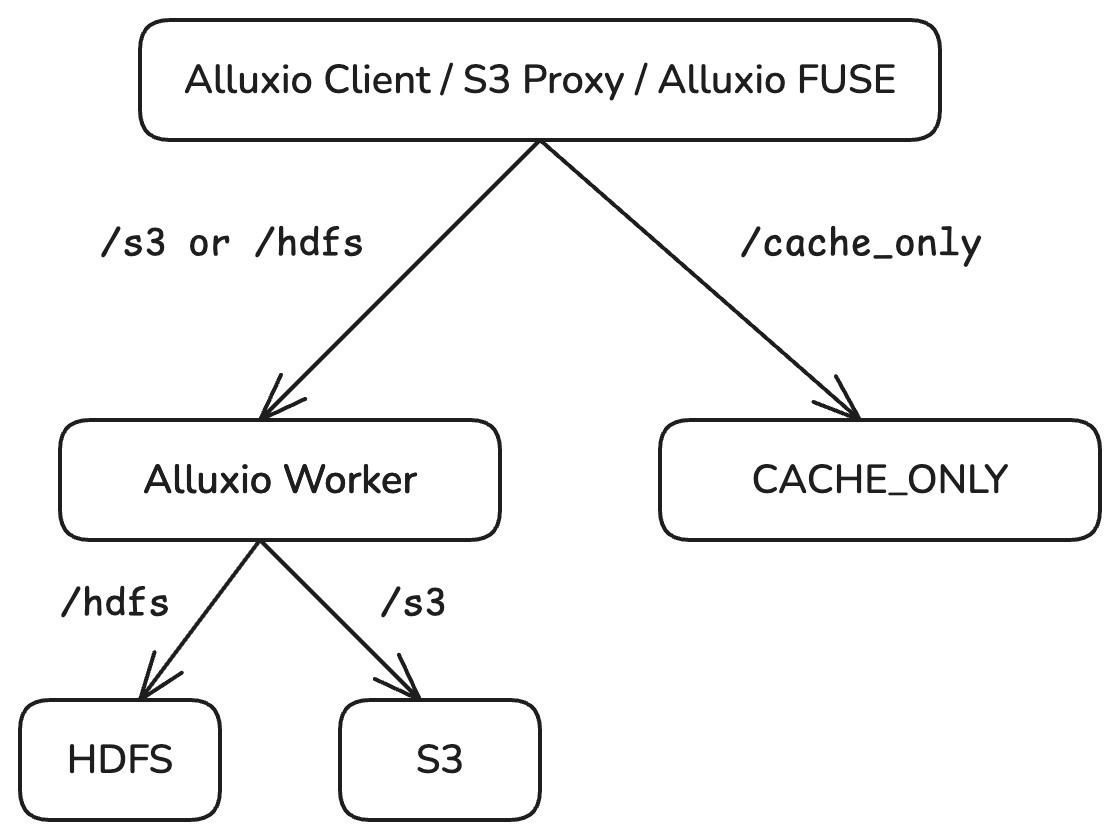
In certain scenarios, the performance and bandwidth of the underlying file system (UFS) may not meet the needs of large-scale data writes. To address this issue, Alluxio offers an option to write data directly to the Alluxio cluster only. Since the process does not interact with UFS, the write performance and bandwidth depends entirely on the performance and bandwidth of the Alluxio cluster. This feature is called CACHE\_ONLY.
The recommended use cases for CACHE\_ONLY include:
* Temporarily saving checkpoint files during AI training
* Shuffle files generated during big data computations
In these use cases, the files written are temporary in nature and not meant to be persisted in storage for long term use.
> Additionally, for scenarios requiring eventual persistence of CACHE\_ONLY files, Alluxio supports an optional async persistence feature, which can be configured as described in the [Enabling Async Persistence](#enabling-async-persistence) section.
## Enabling CACHE\_ONLY
To use the CACHE\_ONLY feature, the CACHE\_ONLY storage component must be separately deployed. Note that Alluxio client directly interfaces with the CACHE\_ONLY storage and does not communicate with the Alluxio worker. The data and metadata in CACHE\_ONLY storage are managed independently by CACHE\_ONLY storage itself. Since files are managed separately, files in the CACHE\_ONLY cannot interact with all the other files served by the Alluxio workers.
### Deploying CACHE\_ONLY storage on Kubernetes
The deployment of CACHE\_ONLY storage is integrated into the Alluxio operator. Enable it by populating the `cacheOnly` field in the Alluxio deployment file.
```yaml
apiVersion: k8s-operator.alluxio.com/v1
kind: AlluxioCluster
metadata:
name: alluxio
spec:
image: /alluxio-enterprise
imageTag:
properties:
worker:
count: 2
pagestore:
size: 100Gi
cacheOnly:
enabled: true
mountPath: "/cache-only"
image: /alluxio-cacheonly
imageTag:
imagePullPolicy: IfNotPresent
# Replace with base64 encoded license generated by
# cat /path/to/license.json | base64 | tr -d "\n"
license:
properties:
journal:
storageClass: "gp2"
worker:
count: 2
tieredstore:
levels:
- level: 0
alias: SSD
mediumtype: SSD
path: /data1/cacheonly/worker
type: hostPath
quota: 10Gi
```
**Note:** The CACHE\_ONLY Worker requires local disk storage for CACHE\_ONLY data. This disk space is completely independent of the Alluxio Worker cache, so estimate the required capacity and reserve disk space accordingly.
### Configuring Resource Usage
Configure `cacheOnly.master.resources` and `cacheOnly.worker.resources` in a similar fashion as the `coordinator` and `worker` fields.
```yaml
apiVersion: k8s-operator.alluxio.com/v1
kind: AlluxioCluster
metadata:
name: alluxio
spec:
cacheOnly:
enabled: true
master:
count: 1
resources:
limits:
cpu: "8"
memory: "40Gi"
requests:
cpu: "8"
memory: "40Gi"
jvmOptions:
- "-Xmx24g"
- "-Xms24g"
- "-XX:MaxDirectMemorySize=8g"
worker:
count: 2
resources:
limits:
cpu: "8"
memory: "20Gi"
requests:
cpu: "8"
memory: "20Gi"
jvmOptions:
- "-Xmx8g"
- "-Xms8g"
- "-XX:MaxDirectMemorySize=8g"
```
The recommended memory calculation is:
```
(${Xmx} + ${MaxDirectMemorySize}) * 1.1 <= ${requests} = ${limit}
```
### Accessing CACHE\_ONLY
Once CACHE\_ONLY storage is deployed, all requests to its mount point will be treated as CACHE\_ONLY requests. You can access CACHE\_ONLY data in various ways.
Access using the Alluxio CLI:
```shell
bin/alluxio fs ls /cache_only
```
Access using the Alluxio FUSE interface:
```shell
cd ${fuse_mount_path}/cache_only
echo '123' > test.txt
cat test.txt
```
## Enabling Async Persistence
For scenarios where temporary data written to Alluxio requires eventual persistence, Alluxio offers an **async persistence** mechanism. This allows data written to a `CACHE_ONLY` mount point to be asynchronously uploaded to a corresponding UFS path as configured.
This is especially useful in environments where immediate persistence is not necessary, but eventual consistency is desired.
### Limitations
1. **Limited metadata operations**: Only basic file persistence is supported; operations like renaming are not reliably handled.
2. **No UFS cleanup**: Deleting files from Alluxio does not automatically remove the corresponding data from UFS.
3. **Weak recovery semantics**: If the UFS and Alluxio versions of a file diverge, Alluxio cannot currently reconcile them.
4. **File modifications retrigger persistence**: Modifying a file in Alluxio will schedule a new async persistence task, potentially creating inconsistent versions across Alluxio and UFS.
5. **Cache isolation**: Files written via `CACHE_ONLY` and later persisted are not removed from `CACHE_ONLY` even after being written to UFS. Reading through the original `CACHE_ONLY` path will hit the `CACHE_ONLY` cache, while reading through the UFS path will use the standard Alluxio Worker pipeline — the two caches do not share data.
### Enabling the feature
To enable the feature, you need to
1. Enabling CACHE\_ONLY, as a prerequisite to enable async persistence
2. Setting `alluxio.gemini.master.async.upload.local.file.path` and the corresponding json path. Note that this should be set on both alluxio and alluxio CACHE\_ONLY machines (See instructions below)
3. Enabling alluxio coordinator (async persistence relies on the job service)
4. Make sure the CACHE\_ONLY masters be able to connect to ETCD
5. If you use operator to deploy, make sure alluxio properties are also set on alluxio CACHE\_ONLY properties. Some operation generated properties need to be specified on CACHE\_ONLY components manually due to the current operator limitation.
### Configuration Options
| Property | Description | Default |
| ------------------------------------------------------ | ----------------------------------------------------- | ------- |
| `alluxio.gemini.master.async.upload.local.file.path` | Path to the async upload path mapping JSON file | *N/A* |
| `alluxio.gemini.master.persistence.checker.interval` | Interval to check and update async persistence status | `1s` |
| `alluxio.gemini.master.persistence.scheduler.interval` | Interval to schedule new async persistence tasks | `1s` |
#### Async Upload Path Mapping Configuration File
The file path specified in alluxio.gemini.master.async.upload.local.file.path should be in JSON format. Example:
```json
{
"cacheOnlyMountPoint": "/cache-only",
"asyncUploadPathMapping": {
"/cache-only/a": "/s3/a",
"/cache-only/b": "/local/c"
},
"blackList": [
".tmp"
]
}
```
#### Supported Keys
| Key | Required | Description |
| ------------------------ | -------- | -------------------------------------------------------------------------------------------------- |
| `cacheOnlyMountPoint` | Yes | The mount point path for CACHE\_ONLY storage |
| `asyncUploadPathMapping` | Yes | Key is the CACHE\_ONLY sub-path, value is the Alluxio path to persist to (resolved by mount table) |
| `blackList` | Optional | Simple filename pattern exclusion list (non-regex) |
***
### Fault Tolerance
1. **Worker failure**: If a `CACHE_ONLY` worker goes offline, Alluxio can retrieve data from other `CACHE_ONLY` workers that have replicas (if replication is enabled).
2. **Master failover**: Metadata required for async persistence is stored in the Alluxio master journal. When a master fails, a standby master can recover the metadata by reading the journal.
3. **Coordinator restart**: Async persistence is managed by the Alluxio Coordinator, which stores job state in a local RocksDB. The coordinator can resume ongoing jobs after a restart by reading the RocksDB state.
4. **Worker reassignment**: If the worker responsible for uploading to UFS fails, the coordinator will reschedule the task to another worker.
***
### Restoring Lost Data from UFS
When a file is lost from `CACHE_ONLY`, Alluxio supports restoring data from UFS under the following mechanisms:
#### Restore Triggers
1. **File open with missing blocks**: If a file opened through a `CACHE_ONLY` path has incomplete blocks, the Alluxio client will attempt to fetch the missing content from UFS and cache it.
2. **File read errors**: If Alluxio encounters an error reading from `CACHE_ONLY`, the client will fallback to reading the file directly from UFS, **without caching it back** into Alluxio.
#### Preconditions for Restore
* The file was previously stored in UFS via async persistence.
* The modification time in UFS is **newer than** the one in Alluxio.
* The file length in UFS matches that in Alluxio metadata.
## Advanced Configurations
### Enabling Multi-Replica
CACHE\_ONLY supports multi-replica writes. Enable this feature by adding the `alluxio.gemini.user.file.replication` configuration in the deployment file:
```yaml
apiVersion: k8s-operator.alluxio.com/v1
kind: AlluxioCluster
metadata:
name: alluxio
spec:
properties:
"alluxio.gemini.user.file.replication": "2"
```
### Enabling Multipart Upload
Alluxio supports temporarily storing data in memory and uploading it to the CACHE\_ONLY cluster in the background using multipart uploads to improve write performance. To enable this feature, add the following configurations:
```yaml
apiVersion: k8s-operator.alluxio.com/v1
kind: AlluxioCluster
metadata:
name: alluxio
spec:
properties:
"alluxio.gemini.user.file.cache.only.multipart.upload.enabled": "true"
"alluxio.gemini.user.file.cache.only.multipart.upload.threads": "16"
"alluxio.gemini.user.file.cache.only.multipart.upload.buffer.number": "16"
```
| Configuration Item | Default | Description |
| ------------------------------------------------------------------ | ------- | ---------------------------------------------- |
| alluxio.gemini.user.file.cache.only.multipart.upload.enabled | false | Enables the multipart upload feature |
| alluxio.gemini.user.file.cache.only.multipart.upload.threads | 16 | Maximum number of threads for multipart upload |
| alluxio.gemini.user.file.cache.only.multipart.upload.buffer.number | 16 | Number of memory buffers for multipart upload |
**Note:** Enabling multipart upload will significantly increase the memory usage of the Alluxio client. The memory usage is calculated as follows:
```
${alluxio.gemini.user.file.cache.only.multipart.upload.buffer.number} * 64MB
```
### Cache Eviction
Files stored as CACHE\_ONLY will not be automatically evicted. The files can be manually deleted to free up space if the capacity is near full. Delete it via Alluxio FUSE with `rm ${file_path}` or run the Alluxio CLI command `bin/alluxio fs rm ${file_path}`