> For the complete documentation index, see [llms.txt](https://documentation.alluxio.io/ee-ai-en/llms.txt). Markdown versions of documentation pages are available by appending `.md` to page URLs; this page is available as [Markdown](https://documentation.alluxio.io/ee-ai-en/ai-3.6/data-access/high-availability/multi-az.md).
# Multiple Availability Zones (AZ)
## Introduction
Alluxio supports high availability by leveraging multiple availability zones. An Alluxio client can fall back to workers in other AZs when all the workers from its local AZ fails to serve the requests.
The multi-AZ support, along with multiple replication and Under File System fallback, provides strong service availability and I/O resiliency. You can read more about the [I/O resiliency](/ee-ai-en/ai-3.6/overview/io-resiliency.md) features in Alluxio.
## Enabling Multi-Availability Zone support
A typical deployment when multiple AZs are available, is to deploy one Alluxio cluster per AZ. To differentiate the clusters in each AZ, each Alluxio cluster must be assigned a unique cluster name.
Create a JSON configuration file to specify all the Alluxio clusters in different AZs with their respective etcd clusters. The following is an example with 3 clusters:
```json
[
{
"clusterNames": ["cluster-1"],
"endpoints": ["http://etcd-1:2379"]
},
{
"clusterNames": ["cluster-2"],
"endpoints": ["http://etcd-2:2379"]
},
{
"clusterNames": ["cluster-3"],
"endpoints": ["http://etcd-3:2379"]
}
]
```
Save the configuration in Alluxio's configuration directory as `multi-az-clusters.json` and link to it in the Alluxio configuration file `alluxio-site.properties`:
```properties
alluxio.multi.cluster.enabled=true
alluxio.multi.cluster.config.path=${alluxio.conf.dir}/multi-az-clusters.json
```
If Alluxio is already running, restart all processes to apply the new configuration. After the restart, check with the following command to see if multi-AZ support is working as expected:
```console
$ bin/alluxio info nodes
```
When configured properly, this command will report the information of the Alluxio worker nodes from all the clusters in different AZs:
```console
Cluster cluster-1
WorkerId Address Status
worker-3e506284-c636-40f9-bdae-0ec695cf32c9 10.0.11.250:29999 ONLINE
worker-a17b8d07-2999-4ee4-ad0d-27929071b963 10.0.11.20:29999 ONLINE
worker-c40952a2-8dd1-4fcb-8a78-ad84f2c5f5cc 10.0.11.134:29999 OFFLINE
Cluster cluster-2
WorkerId Address Status
worker-078a69be-dc3b-4096-93f0-41db38190fd4 10.0.11.202:29999 ONLINE
worker-27537ea1-1e92-4b83-93b9-edaf0c713d85 10.0.11.201:29999 OFFLINE
worker-47412fac-6a31-4bf7-9de6-5cdeb37bc753 10.0.11.154:29999 ONLINE
Cluster cluster-3
WorkerId Address Status
worker-978a6dbe-da3b-4096-a3f0-41d27929071d 10.0.11.202:29999 ONLINE
worker-17537aa1-2e92-2b8b-b3b9-edaf0c713add 10.0.11.123:29999 OFFLINE
worker-37412fad-8a33-3bf3-cde6-5cb37bc75323 10.0.11.567:29999 ONLINE
```
## Deploying Multiple Alluxio Clusters Using the Operator
The Alluxio Operator provides a standardized method for deploying and managing Alluxio clusters within a Kubernetes environment. For comprehensive instructions on installing the Alluxio Operator,\
please refer to the [Alluxio Operator Installation Guide](/ee-ai-en/ai-3.6/start/install/install-alluxio-on-kubernetes.md).
The Operator supports deploying multiple Alluxio clusters through the use of a `clusterGroup` resource.\
This custom resource enables users to define and manage the configuration of multiple Alluxio clusters consistently across a Kubernetes environment.
By leveraging the `clusterGroup`, users can efficiently orchestrate and maintain multiple Alluxio clusters with a shared configuration.
> **Note:** Clusters created through a `clusterGroup` share the same configuration, including properties, resource allocation and scale.\
> To differentiate clusters, the `nodeSelector` field is used—a Kubernetes mechanism that constrains Pods to be scheduled\
> on specific nodes. Each Alluxio cluster should be assigned to distinct AZ using `nodeSelector`\
> to ensure proper separation and deployment.
### Preparation Steps
This example will deploy three Alluxio clusters across two Kubernetes namespaces:
* Cluster 1: `alluxio-a` in namespace `alx-ns`
* Cluster 2: `alluxio-b` in namespace `alx-ns`
* Cluster 3: `alluxio-c` in namespace `alx-ns-2`
Ensure the necessary namespaces (`alx-ns` and `alx-ns-2`) are created prior to deploying the clusters:
```shell
kubectl create namespace alx-ns
kubectl create namespace alx-ns-2
```
### Multi-Cluster Deployment Modes Based on ETCD
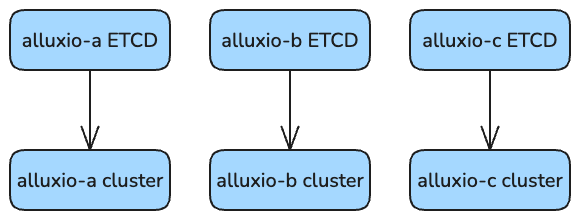
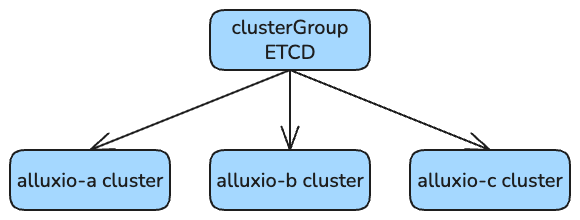
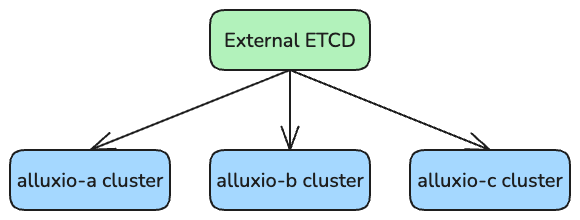
A ConfigMap containing the cluster names and ETCD info of each cluster needs to be created to configure the clusters. Depending on the configuration of ETCD, the ETCD info of each cluster could differ. When deploying multiple Alluxio clusters using the `clusterGroup` resource, there are three supported deployment modes, categorized by the ETCD setup:
* **Independent ETCD for Each Cluster**
* Each Alluxio cluster uses its own dedicated ETCD instance.
* **Shared ETCD Across Clusters**
* Multiple clusters share a single ETCD instance while maintaining isolated namespaces.
* **External ETCD Integration**
* Clusters connect to an externally managed ETCD service.
These modes provide flexibility to accommodate different operational requirements and infrastructure architectures. Users can select the appropriate mode.
#### Independent ETCD Mode
In the *Independent ETCD* deployment mode, each Alluxio cluster operates with its own dedicated ETCD instance.
In this mode, the configuration file `multi-az-clusters.json` must be customized to specify individual ETCD endpoints for each cluster, as shown below:
```json
[
{
"clusterNames": ["alx-ns-alluxio-a"],
"endpoints": ["http://alluxio-a-etcd.alx-ns:2379"]
},
{
"clusterNames": ["alx-ns-alluxio-b"],
"endpoints": ["http://alluxio-b-etcd.alx-ns:2379"]
},
{
"clusterNames": ["alx-ns-2-alluxio-c"],
"endpoints": ["http://alluxio-c-etcd.alx-ns-2:2379"]
}
]
```
The `ConfigMap` must be created in each namespace, and the same configuration file should be used:
```shell
kubectl create configmap multi-cluster --from-file=multi-az-clusters.json -n alx-ns
kubectl create configmap multi-cluster --from-file=multi-az-clusters.json -n alx-ns-2
```
Then, define and apply a `ClusterGroup` manifest to deploy the clusters. Key points:
1. The multi-cluster JSON configuration path must be defined in each cluster’s `properties`.
2. The ConfigMap must be mounted to the `/multi-az` directory in all components of the Alluxio cluster.
Additionally, users must disable the internal ETCD provisioning within the `clusterGroup` by omitting the ETCD dependency in the `dependencies`:
```yaml
apiVersion: k8s-operator.alluxio.com/v1
kind: ClusterGroup
metadata:
name: alluxio-cluster-group
namespace: alx-ns
spec:
dependencies:
dashboard:
image: alluxio/alluxio-dashboard
imageTag: AI-3.6-12.0.2
license: "licenseString"
gateway:
image: alluxio/alluxio-gateway
imageTag: AI-3.6-12.0.2
groups:
- name: alluxio-a
namespace: alx-ns
nodeSelector:
region: az-1
- name: alluxio-b
namespace: alx-ns
nodeSelector:
region: az-2
- name: alluxio-c
namespace: alx-ns-2
nodeSelector:
region: az-3
template:
spec:
image: alluxio/alluxio-enterprise
imageTag: AI-3.6-12.0.2
properties:
alluxio.multi.cluster.enabled: "true"
alluxio.multi.cluster.config.path: "/multi-az/multi-az-clusters.json"
worker:
count: 2
configMaps:
coordinator:
multi-cluster: /multi-az
worker:
multi-cluster: /multi-az
fuse:
multi-cluster: /multi-az
etcd:
replicaCount: 1
```
In this configuration, each Alluxio cluster will independently start and manage its own ETCD instance within its respective namespace. The `clusterGroup` itself does **NOT** deploy an ETCD cluster.
You can verify this by listing the pods in the cluster group namespace:
```console
$ kubectl get pod
NAME READY STATUS RESTARTS AGE
alluxio-cg-dashboard-dfd4dcfb5-fvj8j 1/1 Running 0 3h27m
alluxio-cg-gateway-59df98fb66-kkz6l 1/1 Running 0 3h27m
```
Each Alluxio cluster will run its own ETCD service in its corresponding namespace. For example, in namespace `alx-ns`, both `alluxio-a` and `alluxio-b` clusters deploy separate ETCD pods:
```console
$ kubectl get pod -n alx-ns
NAME READY STATUS RESTARTS AGE
alluxio-a-coordinator-0 1/1 Running 0 3h27m
alluxio-a-etcd-0 1/1 Running 0 3h27m
alluxio-a-grafana-66fd6b957f-gzjqz 1/1 Running 0 3h27m
alluxio-a-prometheus-678b98fccf-c569z 1/1 Running 0 3h27m
alluxio-a-worker-649cdbbbb-g94gh 1/1 Running 0 3h27m
alluxio-a-worker-649cdbbbb-mvvdg 1/1 Running 0 3h27m
alluxio-b-coordinator-0 1/1 Running 0 3h27m
alluxio-b-etcd-0 1/1 Running 0 3h27m
alluxio-b-grafana-5df79f9fdd-rj72b 1/1 Running 0 3h27m
alluxio-b-prometheus-69c867fd77-2whnh 1/1 Running 0 3h27m
alluxio-b-worker-6bc8db98c4-szw95 1/1 Running 0 3h27m
alluxio-b-worker-6bc8db98c4-zcwp9 1/1 Running 0 3h27m
```
Similarly, `alluxio-c` starts its own ETCD instance in `alx-ns-2`:
```console
$ kubectl get pod -n alx-ns-2
NAME READY STATUS RESTARTS AGE
alluxio-c-coordinator-0 1/1 Running 0 3h27m
alluxio-c-etcd-0 1/1 Running 0 3h27m
alluxio-c-grafana-85bbd744d9-9rvnf 1/1 Running 0 3h27m
alluxio-c-prometheus-57cb49b479-29gzv 1/1 Running 0 3h27m
alluxio-c-worker-556c696898-5lgrk 1/1 Running 0 3h27m
alluxio-c-worker-556c696898-m7tzb 1/1 Running 0 3h27m
```
To verify the status of all clusters, use the following command:
```console
$ kubectl exec -it -n alx-ns alluxio-a-coordinator-0 -- alluxio info nodes
```
Example output:
```console
Cluster alx-ns-2-alluxio-c
WorkerId Address Status
worker-0ed62e5d-c6f8-4062-b67d-b88749085fac 10.0.4.33:29999 ONLINE
worker-b940c3bb-f1c3-4446-91a4-663df1aab65b 10.0.4.78:29999 ONLINE
Cluster alx-ns-alluxio-a
WorkerId Address Status
worker-4c134fbc-7d52-4d30-a568-3ecf374ed382 10.0.4.162:29999 ONLINE
worker-eb9af320-d161-4d83-8484-7de105093e20 10.0.4.221:29999 ONLINE
Cluster alx-ns-alluxio-b
WorkerId Address Status
worker-68f3cd7f-e277-48fd-84f5-b653675670a7 10.0.4.226:29999 ONLINE
worker-907b9c42-cce5-4415-9069-3ec9ee6d10d2 10.0.4.175:29999 ONLINE
```
#### Shared ETCD Mode
In the **shared ETCD** deployment mode, all Alluxio clusters share a single ETCD cluster for coordination.
Start by creating a JSON configuration file named `multi-az-clusters.json`, which specifies the participating Alluxio clusters and their shared ETCD endpoints:
```json
[
{
"clusterNames": ["alx-ns-alluxio-a"],
"endpoints": ["http://alluxio-cg-etcd.default:2379"]
},
{
"clusterNames": ["alx-ns-alluxio-b"],
"endpoints": ["http://alluxio-cg-etcd.default:2379"]
},
{
"clusterNames": ["alx-ns-2-alluxio-c"],
"endpoints": ["http://alluxio-cg-etcd.default:2379"]
}
]
```
The `ConfigMap` must be created in each namespace, and the same configuration file should be used:
```shell
kubectl create configmap multi-cluster --from-file=multi-az-clusters.json -n alx-ns
kubectl create configmap multi-cluster --from-file=multi-az-clusters.json -n alx-ns-2
```
Then, define and apply a `ClusterGroup` manifest to deploy the clusters. Key points:
1. The multi-cluster JSON configuration path must be defined in each cluster’s `properties`.
2. The ConfigMap must be mounted to the `/multi-az` directory in all components of the Alluxio cluster.
To enable this mode, configure the `ETCD` dependency within the `dependencies` of the `ClusterGroup` resource.\
Here is an example `ClusterGroup`:
```yaml
apiVersion: k8s-operator.alluxio.com/v1
kind: ClusterGroup
metadata:
name: alluxio-cg
namespace: default
spec:
dependencies:
etcd:
replicaCount: 3
dashboard:
image: alluxio/alluxio-dashboard
imageTag: AI-3.6-12.0.2
license: "licenseString"
gateway:
image: alluxio/alluxio-gateway
imageTag: AI-3.6-12.0.2
groups:
- name: alluxio-a
namespace: alx-ns
nodeSelector:
region: az-1
- name: alluxio-b
namespace: alx-ns
nodeSelector:
region: az-2
- name: alluxio-c
namespace: alx-ns-2
nodeSelector:
region: az-3
template:
spec:
image: alluxio/alluxio-enterprise
imageTag: AI-3.6-12.0.2
properties:
alluxio.multi.cluster.enabled: "true"
alluxio.multi.cluster.config.path: "/multi-az/multi-az-clusters.json"
worker:
count: 2
configMaps:
coordinator:
multi-cluster: /multi-az
worker:
multi-cluster: /multi-az
fuse:
multi-cluster: /multi-az
```
Apply the yaml using the following command:
```shell
kubectl apply -f clusterGroup.yaml
```
Once applied, a shared ETCD cluster will be created, and all Alluxio clusters will connect to it:
```shell
kubectl get pod
NAME READY STATUS RESTARTS AGE
alluxio-cg-dashboard-7868ff9968-844jp 1/1 Running 0 36s
alluxio-cg-etcd-0 1/1 Running 0 28m
alluxio-cg-etcd-1 1/1 Running 0 28m
alluxio-cg-etcd-2 1/1 Running 0 28m
alluxio-cg-gateway-59df98fb66-zh59q 1/1 Running 0 28m
```
Clusters `alluxio-a` and `alluxio-b` will be deployed in the `alx-ns` namespace:
```console
$ kubectl get pod -n alx-ns -w
NAME READY STATUS RESTARTS AGE
alluxio-a-coordinator-0 1/1 Running 1 (7m29s ago) 8m27s
alluxio-a-grafana-66fd6b957f-zp2mh 1/1 Running 0 8m27s
alluxio-a-prometheus-678b98fccf-48p9d 1/1 Running 0 8m27s
alluxio-a-worker-b98859c7-h5qtd 1/1 Running 1 (7m20s ago) 8m27s
alluxio-a-worker-b98859c7-z6wx2 1/1 Running 1 (7m17s ago) 8m27s
alluxio-b-coordinator-0 1/1 Running 1 (7m25s ago) 8m25s
alluxio-b-grafana-5df79f9fdd-wxx6n 1/1 Running 0 8m25s
alluxio-b-prometheus-69c867fd77-fdxc4 1/1 Running 0 8m25s
alluxio-b-worker-5b6d5fdfbd-44r9q 1/1 Running 1 (7m14s ago) 8m25s
alluxio-b-worker-5b6d5fdfbd-k47vh 1/1 Running 1 (7m18s ago) 8m25s
```
Clusters under the `alx-ns-2` namespace, such as `alluxio-c`, will also start as expected:
```console
$ kubectl get pod -n alx-ns-2 -w
NAME READY STATUS RESTARTS AGE
alluxio-c-coordinator-0 1/1 Running 1 (7m30s ago) 8m29s
alluxio-c-grafana-85bbd744d9-v9mr6 1/1 Running 0 8m29s
alluxio-c-prometheus-57cb49b479-w7njl 1/1 Running 0 8m29s
alluxio-c-worker-fb6d6f4cf-bp85r 1/1 Running 1 (7m28s ago) 8m29s
alluxio-c-worker-fb6d6f4cf-pdh9q 1/1 Running 1 (7m20s ago) 8m29s
```
To verify cluster status and worker registration, run:
```shell
kubectl exec -it -n alx-ns alluxio-a-coordinator-0 -- alluxio info nodes
```
The output will show multiple Alluxio clusters and their respective worker nodes:
```console
Cluster alx-ns-2-alluxio-c
WorkerId Address Status
worker-0ed62e5d-c6f8-4062-b67d-b88749085fac 10.0.4.200:29999 ONLINE
worker-b940c3bb-f1c3-4446-91a4-663df1aab65b 10.0.4.718:29999 ONLINE
Cluster alx-ns-alluxio-a
WorkerId Address Status
worker-4c134fbc-7d52-4d30-a568-3ecf374ed382 10.0.4.162:29999 ONLINE
worker-eb9af320-d161-4d83-8484-7de105093e20 10.0.4.120:29999 ONLINE
Cluster alx-ns-alluxio-b
WorkerId Address Status
worker-68f3cd7f-e277-48fd-84f5-b653675670a7 10.0.4.134:29999 ONLINE
worker-907b9c42-cce5-4415-9069-3ec9ee6d10d2 10.0.4.164:29999 ONLINE
```
#### External ETCD
In *External ETCD* mode, all Alluxio clusters are connected to a shared, externally managed ETCD cluster.
If you already have an external ETCD cluster deployed, you can configure Alluxio clusters to connect to it:
```console
$ kubectl get pod
NAME READY STATUS RESTARTS AGE
external-etcd-0 1/1 Running 0 6m10s
external-etcd-1 1/1 Running 0 6m10s
external-etcd-2 1/1 Running 0 6m10s
```
Create a configuration file `multi-az-clusters.json` to define the shared external ETCD endpoint across all clusters:
```json
[
{
"clusterNames": ["alx-ns-alluxio-a"],
"endpoints": ["http://external-etcd.default:2379"]
},
{
"clusterNames": ["alx-ns-alluxio-b"],
"endpoints": ["http://external-etcd.default:2379"]
},
{
"clusterNames": ["alx-ns-2-alluxio-c"],
"endpoints": ["http://external-etcd.default:2379"]
}
]
```
The `ConfigMap` must be created in each namespace, and the same configuration file should be used:
```shell
kubectl create configmap multi-cluster --from-file=multi-az-clusters.json -n alx-ns
kubectl create configmap multi-cluster --from-file=multi-az-clusters.json -n alx-ns-2
```
Then, define and apply a `ClusterGroup` manifest to deploy the clusters. Key points:
1. **Disable ETCD**
* Set `etcd.enabled: false` in the `ClusterGroup` spec to prevent the operator from deploying its own ETCD instances.
* Omit the `etcd` dependency in the `dependencies`.
2. **Specify the external ETCD endpoint** in the `properties` of the Alluxio clusters.
Example `ClusterGroup`:
```yaml
apiVersion: k8s-operator.alluxio.com/v1
kind: ClusterGroup
metadata:
name: alluxio-cg
namespace: default
spec:
dependencies: # ETCD is not included here
dashboard:
image: alluxio/alluxio-dashboard
imageTag: AI-3.6-12.0.2
license: "licenseString"
gateway:
image: alluxio/alluxio-gateway
imageTag: AI-3.6-12.0.2
groups:
- name: alluxio-a
namespace: alx-ns
nodeSelector:
region: az-1
- name: alluxio-b
namespace: alx-ns
nodeSelector:
region: az-2
- name: alluxio-c
namespace: alx-ns-2
nodeSelector:
region: az-3
template:
spec:
image: alluxio/alluxio-enterprise
imageTag: AI-3.6-12.0.2
properties:
alluxio.multi.cluster.enabled: "true"
alluxio.multi.cluster.config.path: "/multi-az/multi-az-clusters.json"
alluxio.etcd.endpoints: "http://external-etcd.default:2379"
worker:
count: 2
configMaps:
coordinator:
multi-cluster: /multi-az
worker:
multi-cluster: /multi-az
fuse:
multi-cluster: /multi-az
etcd:
enabled: false # Explicitly disable internal ETCD
```
Apply the configuration:
```console
$ kubectl apply -f clusterGroup.yaml
```
The external ETCD pods should be running in the `default` namespace:
```console
$ kubectl get pod
NAME READY STATUS RESTARTS AGE
alluxio-cg-dashboard-dfd4dcfb5-h2wbw 1/1 Running 0 8m45s
alluxio-cg-gateway-59df98fb66-7jd6x 1/1 Running 0 8m46s
external-etcd-0 1/1 Running 0 12m
external-etcd-1 1/1 Running 0 12m
external-etcd-2 1/1 Running 0 12m
```
Pods for each Alluxio cluster in their respective namespaces:
```console
$ kubectl get pod -n alx-ns
NAME READY STATUS RESTARTS AGE
alluxio-a-coordinator-0 1/1 Running 0 8m36s
alluxio-a-grafana-66fd6b957f-kcb4r 1/1 Running 0 8m36s
alluxio-a-prometheus-678b98fccf-lcgmp 1/1 Running 0 8m36s
alluxio-a-worker-66768f7d46-42tvc 1/1 Running 0 8m36s
alluxio-a-worker-66768f7d46-zlccd 1/1 Running 0 8m36s
alluxio-b-coordinator-0 1/1 Running 0 8m34s
alluxio-b-grafana-5df79f9fdd-qmnfw 1/1 Running 0 8m34s
alluxio-b-prometheus-69c867fd77-db72c 1/1 Running 0 8m34s
alluxio-b-worker-5f8dbd89dc-g54c2 1/1 Running 0 8m34s
alluxio-b-worker-5f8dbd89dc-ltm5p 1/1 Running 0 8m33s
```
```console
$ kubectl get pod -n alx-ns-2
NAME READY STATUS RESTARTS AGE
alluxio-c-coordinator-0 1/1 Running 0 8m34s
alluxio-c-grafana-85bbd744d9-pxgmg 1/1 Running 0 8m34s
alluxio-c-prometheus-57cb49b479-jpqff 1/1 Running 0 8m34s
alluxio-c-worker-6b55f954b4-8bd6l 1/1 Running 0 8m34s
alluxio-c-worker-6b55f954b4-gg5qj 1/1 Running 0 8m33s
```
Check the multi-cluster status:
```console
$ kubectl exec -it -n alx-ns alluxio-a-coordinator-0 -- alluxio info nodes
Cluster alx-ns-2-alluxio-c
WorkerId Address Status
worker-0ed62e5d-c6f8-4062-b67d-b88749085fac 10.0.4.36:29999 ONLINE
worker-b940c3bb-f1c3-4446-91a4-663df1aab65b 10.0.4.15:29999 ONLINE
Cluster alx-ns-alluxio-a
WorkerId Address Status
worker-4c134fbc-7d52-4d30-a568-3ecf374ed382 10.0.4.162:29999 ONLINE
worker-eb9af320-d161-4d83-8484-7de105093e20 10.0.4.221:29999 ONLINE
Cluster alx-ns-alluxio-b
WorkerId Address Status
worker-68f3cd7f-e277-48fd-84f5-b653675670a7 10.0.4.85:29999 ONLINE
worker-907b9c42-cce5-4415-9069-3ec9ee6d10d2 10.0.4.222:29999 ONLINE
```
## Enabling optimized I/O for multi-AZ replicated files
Alluxio supports [optimized I/O for multi-replicated files](/ee-ai-en/ai-3.6/data-access/high-availability/multiple-replicas.md#optimized-io-for-multi-replicated-files). In the case of files that are replicated in multiple AZs, in addition to faster access, the replications can also provide high availability when some clusters fail due to an AZ outage. When an Alluxio client reads a multi-AZ replicated file, it will first check its local cluster to see if the file is cached by any of the local workers. If so, the client will try to use a local worker to read the file. If none of the local workers have cached the file, or the client encounters an error reading from all the local workers in the case of an outage in the local AZ, it will fall back to workers in other clusters in other AZs. If all the candidate workers fail to serve the read request, the client will eventually fall back to the UFS as a last resort.
For files that are not replicated in multiple AZs, the client will not fall back to other AZs when the local workers fail to serve the request, and will fall back to the UFS directly.
Note that if this feature is enabled, a client prefers a fully cached replica over a partially cached one, even if it is from a remote worker. The client will choose a preferred data source according to the following order:
1. A local worker that has fully cached the file.
2. A remote worker that has fully cached the file.
3. When no workers, local or remote, have fully cached the file, a local worker.
4. When no local candidate workers are available, a remote worker.
5. When no candidate workers in any AZ are available, the UFS.
### Enabling passive cache
It is recommended to enable [Passive Cache](/ee-ai-en/ai-3.6/data-access/high-availability/multiple-replicas.md#passive-cache-for-auto-replica-creation) in a multi-AZ replicated deployment. This ensures under-replicated files will automatically get more replicas and the performance will not be impacted because of cache misses on the preferred workers.
To enable optimized I/O and passive cache, add the following configuration to `alluxio-site.properties`:
```properties
# Note that multi-replica optimized IO must be enabled for passive cache to take effect
alluxio.user.replica.prefer.cached.replicas=true
alluxio.user.file.passive.cache.enabled=true
```