> For the complete documentation index, see [llms.txt](https://documentation.alluxio.io/ee-ai-cn/llms.txt). Markdown versions of documentation pages are available by appending `.md` to page URLs; this page is available as [Markdown](https://documentation.alluxio.io/ee-ai-cn/ai-3.4/api/fuse-based-posix-api.md).
# 基于 FUSE 的 POSIX API
## 概述
Alluxio FUSE提供了 POSIX API 协议的支持,可以将 Alluxio 文件系统挂载为大多数 Unix 系统上的标准文件系统,使得 `ls`、`cat` 或 `mkdir` 这样的标准命令也可以在Alluxio上正常使用。 集成POSIX API 之后,无论应用程序是用 C、C++、Python、Ruby、Perl 还是 Java 编写,都可以与 Alluxio 进行交互,而无需在现有应用程序中集成任何 Alluxio 库。
Alluxio FUSE 与 S3Fs、mountable HDFS 等项目不同,后者需要将特定的存储服务(如 S3 或 HDFS)挂载到本地文件系统。 而 Alluxio POSIX API 是一个通用的解决方案,适用于 Alluxio 所支持的多种存储系统。 对于频繁使用数据的应用,Alluxio的数据编排和缓存功能能够大幅加速I/O访问、提高读写性能。
目前,Alluxio POSIX API 广泛应用于模型训练以及将模型分发上线的业务场景。
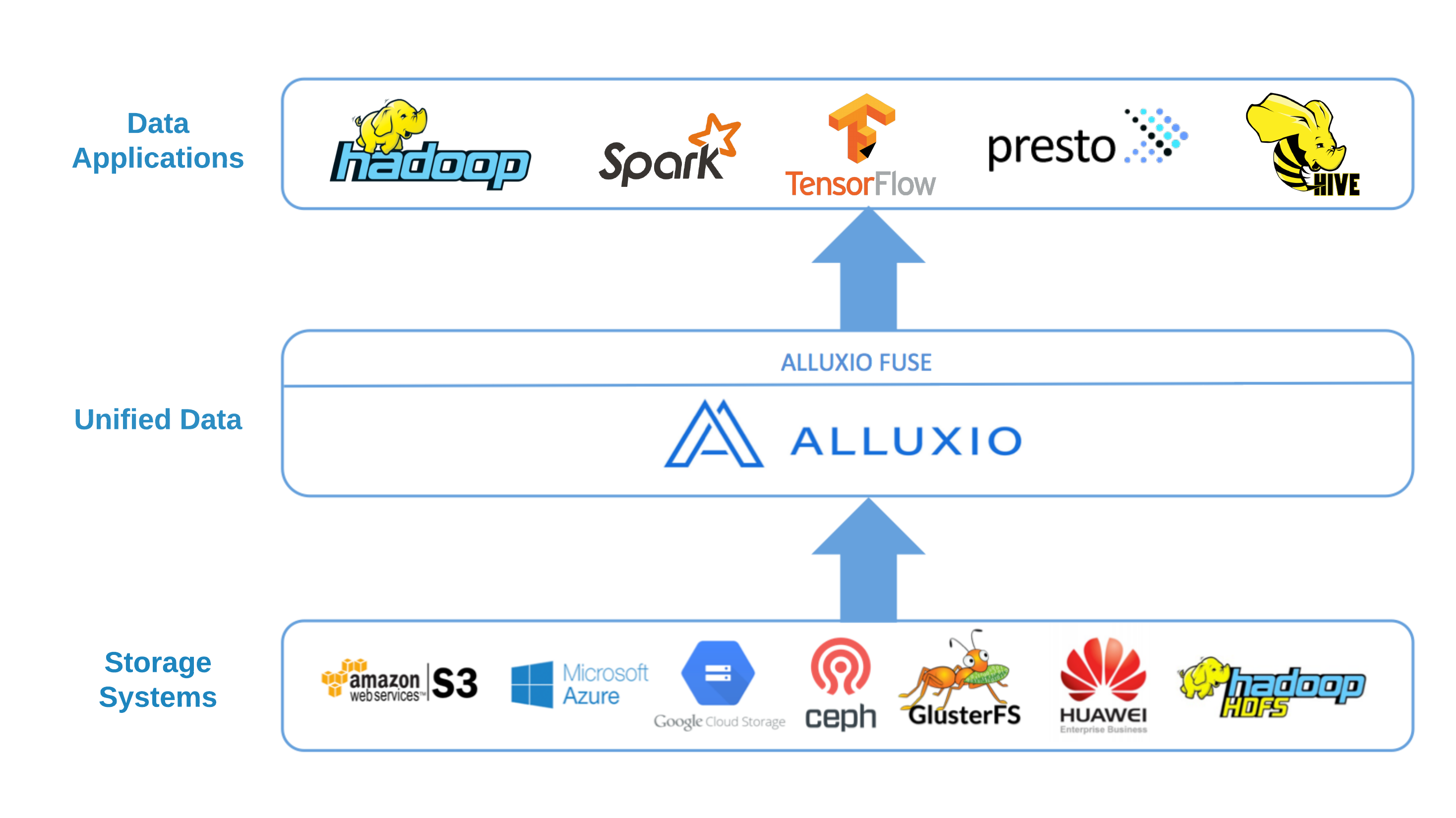 Alluxio POSIX API 基于 FUSE 实现,它支持大多数基本文件系统操作,但考虑到 Alluxio 的固有特性(如一次写入/多次读取的文件数据模型),它挂载的文件系统不具备完整的 POSIX 语义,具体限制参考关于功能和限制的章节。
其中需要注意的是,Alluxio 不支持在文件路径名中包含一些特殊字符:
1. 问号 ('?')
2. 带有句号的模式(./ 和 ./)
3. 反斜杠 ('')
## 在 Kubernetes 上使用 FUSE
### 部署条件
在按照说明进行操作之前,请确保已经正确安装 Alluxio 集群。 关于如何安装Alluxio集群,请参阅[在 Kubernetes 上安装 Alluxio](/ee-ai-cn/ai-3.4/start/install-alluxio-on-kubernetes.md)页面。
### 使用 CSI 提供的 PVC 进行挂载
[容器存储接口](https://github.com/container-storage-interface/spec/blob/master/spec.md)(CSI) 是 Kubernetes 定义的一个标准,用于将存储系统暴露给容器。在 Kubernetes 上使用 Alluxio FUSE 时默认使用 CSI。
集群安装完后,operator 会创建一个名为 `alluxio-alluxio-csi-fuse-pvc` 的 PVC。 您可以将 PVC 挂载到所需的 pod 上,operator会自动创建并绑定合适的 PV。
```yaml
apiVersion: v1
kind: Pod
metadata:
name: fuse-test-0
labels:
app: alluxio
spec:
containers:
- image: ubuntu:22.04
imagePullPolicy: IfNotPresent
name: fuse-test
command: ["sleep", "infinity"]
volumeMounts:
- mountPath: /data
name: alluxio-pvc
mountPropagation: HostToContainer
volumes:
- name: alluxio-pvc
persistentVolumeClaim:
claimName: alluxio-alluxio-csi-fuse-pvc
```
在上述配置中会把 FUSE 挂载到 `/data` 目录。下面是有关配置的一些详细说明:
* 所有 pod 或 replica set 都可以使用相同的 PVC。同一节点上的 pod 将共享同一个 FUSE 进程。
* `mountPropagation` 字段对于 FUSE 进程崩溃时自动恢复是必须的。
您可以在本地目录运行 I/O 操作(如 shell 命令、Pytorch训练脚本等)。下面是一个简单的示例:
```shell
$ kubectl exec -it fuse-test-0 -- bash
root@fuse-test-0:/$ ls /data/
s3
root@fuse-test-0:/$ echo "hello, world!" >/data/s3/message.txt
root@fuse-test-0:/$ ls /data/s3
message.txt
root@fuse-test-0:/$ cat /data/s3/message.txt
hello, world!
# accessing the path `/data/s3` will be the same as accessing `/s3` with other way to access the cluster
$ kubectl exec -it alluxio-coordinator-0 -- alluxio fs ls /s3/message.txt
14 06-27-2024 07:54:40:000 FILE /message.txt
```
这些操作将由 Alluxio 系统进行翻译和执行,并根据配置在底层存储上执行。
## 功能和限制
Alluxio 支持大多数基本文件系统操作。 不过,Alluxio 作为一个提供分布式缓存能力的系统,由于缓存功能本身的特点,有些操作并不完全支持。
| 类型 | 支持的操作 | 不支持的操作 |
| ------ | ------------------------------------------- | -------------------------------------- |
| 元数据写入 | 创建文件、删除文件、创建目录、删除目录、重命名、chown, chgrp, chmod | symlink、link、utimens、chattr、sticky bit |
| 元数据读取 | 获取文件状态, 获取目录状态, ls目录 | |
| 数据写入 | 顺序写、追加写、随机写、覆盖写、截断(truncate) | 多线程/多客户端并发写入同一文件 |
| 数据读取 | 顺序读, 随机读, 多线程/多客户端并发读取同一文件 | |
| 其它组合情况 | | FIFO 特殊文件类型 |
要启用追加写(append write)或随机写(random write),需要添加 `alluxio.user.fuse.random.access.file.stream.enabled=true` 的配置
## 进阶配置
### FUSE 挂载选项
您可以通过在 Alluxio 集群的 YAML 文件中更新 `mountOptions` 配置来设置FUSE的挂载选项。 如果未指定挂载选项,默认会使用 Alluxio 配置中的 `alluxio.fuse.mount.options` 的值(默认值为`direct_io`)。 Linux 可用的挂载选项可以参考 [这里](http://man7.org/linux/man-pages/man8/mount.fuse3.8.html) 。
```yaml
fuse:
mountOptions:
- allow_other
- kernel_cache
- entry_timeout=10000
- attr_timeout=10000
- max_idle_threads=256
- max_background=256
```
| 挂载选项 | 默认值 | 调优建议 | 描述 |
| -------------------- | ------ | ----------------------------------- | ---------------------------------------------------------------------------------------------------------------------------------------------------------------------------------------------------------- |
| direct\_io | 默认启用 | 在 Kubernetes 环境中部署 Alluxio Fuse 时设置 | 启用 \`direct\_io\` 后,内核将不缓存数据并提前读取。它避免了系统缓冲区占用太多缓存,提高了 kubernetes 环境中 pod 的稳定性 |
| kernel\_cache | | | \`kernel\_cache\` 利用内核系统缓存提升读取性能。 如果开启此功能,需要保证该系统中的文件数据只会通过FUSE进行修改,而不会从外部被修改(比如不能直接通过hdfs或者s3等底层存储对文件进行修改) |
| auto\_cache | | 在非Kubernetes环境上部署 Alluxio Fuse 时设置 | \`auto\_cache\`利用内核系统缓存提升读取性能。 如果文件的修改时间或大小自上次打开之后发生了变化,缓存数据将失效,而不会无条件地一直保留缓存数据。 更多信息请参见 \[libfuse 文档]\() |
| attr\_timeout=N | 1.0 | 600 | 文件/目录属性被缓存的超时时间(秒) |
| big\_writes | | 建议设置 | 阻止 Fuse 将 I/O 分割成小块,加快写入速度。 \[libfuse3 中不支持]\( 如果使用 libfuse3,该选项将被忽略。 |
| entry\_timeout=N | 1.0 | 600 | 文件名称的查找结果被缓存后的超时时间(以秒为单位) |
| max\_read=N | 131072 | 使用默认值 | 单次 Fuse 读请求中数据的最大大小,默认值为无限大。注意到操作系统内核本身可能也会对读取请求的大小有限制。 |
| max\_background=N | 12 | 256 | FUSE 内核驱动程序允许提交的最大未完成后台请求数。 |
| max\_idle\_threads=N | 10 | 256 | 允许的空闲 FUSE daemon 线程的最大数量。 如果该值设置过小,FUSE 可能会频繁创建和销毁线程,从而产生额外的性能开销。 |
### 不使用 PVC 挂载 FUSE
如果所使用的 Kubernetes 版本不支持 CSI,或者云厂商没有提供使用 CSI 的权限,可以尝试使用 DaemonSet 类型的 Alluxio FUSE。 在这种类型中,需要预先在所有节点上部署 FUSE Pod(可以使用 `nodeSelector` 限制在特定节点上部署)。
要使用 DaemonSet FUSE,需要在部署集群前更改 `alluxio-cluster.yaml` 配置:
```yaml
apiVersion: k8s-operator.alluxio.com/v1
kind: AlluxioCluster
spec:
fuse:
type: daemonSet
hostPathForMount: /mnt/alluxio/fuse # will use /mnt/alluxio/fuse if not specified
nodeSelector:
alluxio.com/selected-for-fuse: true
```
这样 FUSE pod 将部署到所有带有 `alluxio.com/selected-for-fuse: true`标签的节点上。
DaemonSet FUSE 会将 FUSE 挂载到 `hostPathForMount` 指定的宿主机路径上。 如果要在 pod 中加载 FUSE,则还需要添加 `hostPath` 卷:
```yaml
apiVersion: v1
kind: Pod
metadata:
name: fuse-test-0
labels:
app: alluxio
spec:
containers:
- image: ubuntu:22.04
imagePullPolicy: IfNotPresent
name: fuse-test
command: ["sleep", "infinity"]
volumeMounts:
- mountPath: /mnt/alluxio
name: alluxio-fuse-mount
mountPropagation: HostToContainer
volumes:
- name: alluxio-fuse-mount
hostPath:
path: /mnt/alluxio
type: Directory
```
上面的示例会挂载 fuse 挂载点的父目录并设置 `mountPropagation`。 这样的话,当 FUSE 进程崩溃时,容器中的挂载点便可自动恢复。
### 数据隔离
挂载的 FUSE 设备默认会访问 Alluxio 命名空间的根目录,其中包含所有挂载点。 如果希望为其他用户提供 FUSE 并防止其访问到错误的文件或修改路径,方法如下:
#### 使用子目录
挂载 PVC 的子目录,适用于可以控制 Pod 描述的用户。
```yaml
apiVersion: v1
kind: Pod
metadata:
name: fuse-test-0
labels:
app: alluxio
spec:
containers:
- image: ubuntu:22.04
imagePullPolicy: IfNotPresent
name: fuse-test
command: ["sleep", "infinity"]
volumeMounts:
- mountPath: /data
name: alluxio-pvc
mountPropagation: HostToContainer
subPath: s3/path/to/files
volumes:
- name: alluxio-pvc
persistentVolumeClaim:
claimName: alluxio-alluxio-csi-fuse-pvc
```
在示例配置中,访问容器中的 `/data` 路径与访问 Alluxio 命名空间中的 `/s3/path/to/files` 相同。
DaemonSet FUSE 也可以使用 `subPath`,但 `subPath` 会中断新的 FUSE 挂载点对容器中挂载路径的传播,并阻止挂载点的自动恢复。请谨慎使用。
#### 创建独立的PVC
使用自定义 StorageClass 创建 PVC 可以将 PVC 绑定到子路径。这需要额外的操作,适合在无法控制用户 Pod 的情况下使用。
```yaml
apiVersion: storage.k8s.io/v1
kind: StorageClass
metadata:
name: alluxio-csi-s3
parameters:
alluxioClusterName: alluxio
alluxioClusterNamespace: default
mountPath: /s3/path/to/files
provisioner: alluxio
volumeBindingMode: WaitForFirstConsumer
---
apiVersion: v1
kind: PersistentVolumeClaim
metadata:
name: alluxio-csi-s3
spec:
accessModes:
- ReadWriteOnce
resources:
requests:
storage: 1Mi
storageClassName: alluxio-csi-s3
```
创建上述的 StorageClass 和 PVC,并将 PVC 挂载到容器中。 当访问容器中的挂载点时,将会访问 Alluxio 命名空间中的 `/s3/path/to/files`。
### 从不同的namespace访问
在Kubernetes中,PVC是namespace级别的资源。如果Pod在其他namespace中,为了访问CSI fuse,需要在当前namespace中创建独立的PVC:
```yaml
apiVersion: v1
kind: PersistentVolumeClaim
metadata:
name: alluxio-alluxio-csi-fuse-pvc
spec:
accessModes:
- ReadWriteOnce
resources:
requests:
storage: 1Mi
storageClassName: alluxio-csi-storage-class
```
将配置保存到`csi-pvc.yaml`,然后执行:
```shell
kubectl create -f csi-pvc.yaml -n
```
请注意,CSI fuse pod仍然会启动在和Alluxio集群相同的namespace中。
Alluxio POSIX API 基于 FUSE 实现,它支持大多数基本文件系统操作,但考虑到 Alluxio 的固有特性(如一次写入/多次读取的文件数据模型),它挂载的文件系统不具备完整的 POSIX 语义,具体限制参考关于功能和限制的章节。
其中需要注意的是,Alluxio 不支持在文件路径名中包含一些特殊字符:
1. 问号 ('?')
2. 带有句号的模式(./ 和 ./)
3. 反斜杠 ('')
## 在 Kubernetes 上使用 FUSE
### 部署条件
在按照说明进行操作之前,请确保已经正确安装 Alluxio 集群。 关于如何安装Alluxio集群,请参阅[在 Kubernetes 上安装 Alluxio](/ee-ai-cn/ai-3.4/start/install-alluxio-on-kubernetes.md)页面。
### 使用 CSI 提供的 PVC 进行挂载
[容器存储接口](https://github.com/container-storage-interface/spec/blob/master/spec.md)(CSI) 是 Kubernetes 定义的一个标准,用于将存储系统暴露给容器。在 Kubernetes 上使用 Alluxio FUSE 时默认使用 CSI。
集群安装完后,operator 会创建一个名为 `alluxio-alluxio-csi-fuse-pvc` 的 PVC。 您可以将 PVC 挂载到所需的 pod 上,operator会自动创建并绑定合适的 PV。
```yaml
apiVersion: v1
kind: Pod
metadata:
name: fuse-test-0
labels:
app: alluxio
spec:
containers:
- image: ubuntu:22.04
imagePullPolicy: IfNotPresent
name: fuse-test
command: ["sleep", "infinity"]
volumeMounts:
- mountPath: /data
name: alluxio-pvc
mountPropagation: HostToContainer
volumes:
- name: alluxio-pvc
persistentVolumeClaim:
claimName: alluxio-alluxio-csi-fuse-pvc
```
在上述配置中会把 FUSE 挂载到 `/data` 目录。下面是有关配置的一些详细说明:
* 所有 pod 或 replica set 都可以使用相同的 PVC。同一节点上的 pod 将共享同一个 FUSE 进程。
* `mountPropagation` 字段对于 FUSE 进程崩溃时自动恢复是必须的。
您可以在本地目录运行 I/O 操作(如 shell 命令、Pytorch训练脚本等)。下面是一个简单的示例:
```shell
$ kubectl exec -it fuse-test-0 -- bash
root@fuse-test-0:/$ ls /data/
s3
root@fuse-test-0:/$ echo "hello, world!" >/data/s3/message.txt
root@fuse-test-0:/$ ls /data/s3
message.txt
root@fuse-test-0:/$ cat /data/s3/message.txt
hello, world!
# accessing the path `/data/s3` will be the same as accessing `/s3` with other way to access the cluster
$ kubectl exec -it alluxio-coordinator-0 -- alluxio fs ls /s3/message.txt
14 06-27-2024 07:54:40:000 FILE /message.txt
```
这些操作将由 Alluxio 系统进行翻译和执行,并根据配置在底层存储上执行。
## 功能和限制
Alluxio 支持大多数基本文件系统操作。 不过,Alluxio 作为一个提供分布式缓存能力的系统,由于缓存功能本身的特点,有些操作并不完全支持。
| 类型 | 支持的操作 | 不支持的操作 |
| ------ | ------------------------------------------- | -------------------------------------- |
| 元数据写入 | 创建文件、删除文件、创建目录、删除目录、重命名、chown, chgrp, chmod | symlink、link、utimens、chattr、sticky bit |
| 元数据读取 | 获取文件状态, 获取目录状态, ls目录 | |
| 数据写入 | 顺序写、追加写、随机写、覆盖写、截断(truncate) | 多线程/多客户端并发写入同一文件 |
| 数据读取 | 顺序读, 随机读, 多线程/多客户端并发读取同一文件 | |
| 其它组合情况 | | FIFO 特殊文件类型 |
要启用追加写(append write)或随机写(random write),需要添加 `alluxio.user.fuse.random.access.file.stream.enabled=true` 的配置
## 进阶配置
### FUSE 挂载选项
您可以通过在 Alluxio 集群的 YAML 文件中更新 `mountOptions` 配置来设置FUSE的挂载选项。 如果未指定挂载选项,默认会使用 Alluxio 配置中的 `alluxio.fuse.mount.options` 的值(默认值为`direct_io`)。 Linux 可用的挂载选项可以参考 [这里](http://man7.org/linux/man-pages/man8/mount.fuse3.8.html) 。
```yaml
fuse:
mountOptions:
- allow_other
- kernel_cache
- entry_timeout=10000
- attr_timeout=10000
- max_idle_threads=256
- max_background=256
```
| 挂载选项 | 默认值 | 调优建议 | 描述 |
| -------------------- | ------ | ----------------------------------- | ---------------------------------------------------------------------------------------------------------------------------------------------------------------------------------------------------------- |
| direct\_io | 默认启用 | 在 Kubernetes 环境中部署 Alluxio Fuse 时设置 | 启用 \`direct\_io\` 后,内核将不缓存数据并提前读取。它避免了系统缓冲区占用太多缓存,提高了 kubernetes 环境中 pod 的稳定性 |
| kernel\_cache | | | \`kernel\_cache\` 利用内核系统缓存提升读取性能。 如果开启此功能,需要保证该系统中的文件数据只会通过FUSE进行修改,而不会从外部被修改(比如不能直接通过hdfs或者s3等底层存储对文件进行修改) |
| auto\_cache | | 在非Kubernetes环境上部署 Alluxio Fuse 时设置 | \`auto\_cache\`利用内核系统缓存提升读取性能。 如果文件的修改时间或大小自上次打开之后发生了变化,缓存数据将失效,而不会无条件地一直保留缓存数据。 更多信息请参见 \[libfuse 文档]\() |
| attr\_timeout=N | 1.0 | 600 | 文件/目录属性被缓存的超时时间(秒) |
| big\_writes | | 建议设置 | 阻止 Fuse 将 I/O 分割成小块,加快写入速度。 \[libfuse3 中不支持]\( 如果使用 libfuse3,该选项将被忽略。 |
| entry\_timeout=N | 1.0 | 600 | 文件名称的查找结果被缓存后的超时时间(以秒为单位) |
| max\_read=N | 131072 | 使用默认值 | 单次 Fuse 读请求中数据的最大大小,默认值为无限大。注意到操作系统内核本身可能也会对读取请求的大小有限制。 |
| max\_background=N | 12 | 256 | FUSE 内核驱动程序允许提交的最大未完成后台请求数。 |
| max\_idle\_threads=N | 10 | 256 | 允许的空闲 FUSE daemon 线程的最大数量。 如果该值设置过小,FUSE 可能会频繁创建和销毁线程,从而产生额外的性能开销。 |
### 不使用 PVC 挂载 FUSE
如果所使用的 Kubernetes 版本不支持 CSI,或者云厂商没有提供使用 CSI 的权限,可以尝试使用 DaemonSet 类型的 Alluxio FUSE。 在这种类型中,需要预先在所有节点上部署 FUSE Pod(可以使用 `nodeSelector` 限制在特定节点上部署)。
要使用 DaemonSet FUSE,需要在部署集群前更改 `alluxio-cluster.yaml` 配置:
```yaml
apiVersion: k8s-operator.alluxio.com/v1
kind: AlluxioCluster
spec:
fuse:
type: daemonSet
hostPathForMount: /mnt/alluxio/fuse # will use /mnt/alluxio/fuse if not specified
nodeSelector:
alluxio.com/selected-for-fuse: true
```
这样 FUSE pod 将部署到所有带有 `alluxio.com/selected-for-fuse: true`标签的节点上。
DaemonSet FUSE 会将 FUSE 挂载到 `hostPathForMount` 指定的宿主机路径上。 如果要在 pod 中加载 FUSE,则还需要添加 `hostPath` 卷:
```yaml
apiVersion: v1
kind: Pod
metadata:
name: fuse-test-0
labels:
app: alluxio
spec:
containers:
- image: ubuntu:22.04
imagePullPolicy: IfNotPresent
name: fuse-test
command: ["sleep", "infinity"]
volumeMounts:
- mountPath: /mnt/alluxio
name: alluxio-fuse-mount
mountPropagation: HostToContainer
volumes:
- name: alluxio-fuse-mount
hostPath:
path: /mnt/alluxio
type: Directory
```
上面的示例会挂载 fuse 挂载点的父目录并设置 `mountPropagation`。 这样的话,当 FUSE 进程崩溃时,容器中的挂载点便可自动恢复。
### 数据隔离
挂载的 FUSE 设备默认会访问 Alluxio 命名空间的根目录,其中包含所有挂载点。 如果希望为其他用户提供 FUSE 并防止其访问到错误的文件或修改路径,方法如下:
#### 使用子目录
挂载 PVC 的子目录,适用于可以控制 Pod 描述的用户。
```yaml
apiVersion: v1
kind: Pod
metadata:
name: fuse-test-0
labels:
app: alluxio
spec:
containers:
- image: ubuntu:22.04
imagePullPolicy: IfNotPresent
name: fuse-test
command: ["sleep", "infinity"]
volumeMounts:
- mountPath: /data
name: alluxio-pvc
mountPropagation: HostToContainer
subPath: s3/path/to/files
volumes:
- name: alluxio-pvc
persistentVolumeClaim:
claimName: alluxio-alluxio-csi-fuse-pvc
```
在示例配置中,访问容器中的 `/data` 路径与访问 Alluxio 命名空间中的 `/s3/path/to/files` 相同。
DaemonSet FUSE 也可以使用 `subPath`,但 `subPath` 会中断新的 FUSE 挂载点对容器中挂载路径的传播,并阻止挂载点的自动恢复。请谨慎使用。
#### 创建独立的PVC
使用自定义 StorageClass 创建 PVC 可以将 PVC 绑定到子路径。这需要额外的操作,适合在无法控制用户 Pod 的情况下使用。
```yaml
apiVersion: storage.k8s.io/v1
kind: StorageClass
metadata:
name: alluxio-csi-s3
parameters:
alluxioClusterName: alluxio
alluxioClusterNamespace: default
mountPath: /s3/path/to/files
provisioner: alluxio
volumeBindingMode: WaitForFirstConsumer
---
apiVersion: v1
kind: PersistentVolumeClaim
metadata:
name: alluxio-csi-s3
spec:
accessModes:
- ReadWriteOnce
resources:
requests:
storage: 1Mi
storageClassName: alluxio-csi-s3
```
创建上述的 StorageClass 和 PVC,并将 PVC 挂载到容器中。 当访问容器中的挂载点时,将会访问 Alluxio 命名空间中的 `/s3/path/to/files`。
### 从不同的namespace访问
在Kubernetes中,PVC是namespace级别的资源。如果Pod在其他namespace中,为了访问CSI fuse,需要在当前namespace中创建独立的PVC:
```yaml
apiVersion: v1
kind: PersistentVolumeClaim
metadata:
name: alluxio-alluxio-csi-fuse-pvc
spec:
accessModes:
- ReadWriteOnce
resources:
requests:
storage: 1Mi
storageClassName: alluxio-csi-storage-class
```
将配置保存到`csi-pvc.yaml`,然后执行:
```shell
kubectl create -f csi-pvc.yaml -n
```
请注意,CSI fuse pod仍然会启动在和Alluxio集群相同的namespace中。